When it comes to effective customer support, chatbots play an important role.
From ensuring real-time responses to providing personalized answers, chatbots can prove helpful for human-like and accurate answers to user questions.
However, for an AI chatbot to deliver the right answers, it must be trained properly, keeping your customer expectations in mind…and this process isn’t as simple as it sounds.
Want to know how AI chatbots are actually trained? You have come to the right place!
In this blog, you’ll learn the key steps involved in training an AI chatbot, along with practical tips to ensure better performance.
So, let’s get started!
Why Training a Chatbot Matters for Improving Customer Support Experience
If you’re reading this blog, you likely already understand what chatbots are and how they support modern customer service teams.
But for the sake of this guide, here is a sample definition of AI chatbots: “Chatbots are virtual assistants that leverage the power of AI to interact with users in human-like conversations.”
In simple words, it is an AI-powered tool designed to provide quick answers without sounding robotic.
When trained properly, a chatbot can significantly improve your customer support experience by:
- Providing real-time responses to customer queries
- Delivering personalized answers that make visitors feel valued
- Collecting customer feedback through surveys and feedback forms
- Improving overall customer query resolution rates
To further highlight their importance, conversational AI is expected to reduce global call center customer service costs by up to $80 billion.
How to Train an AI Chatbot [Step-By-Step Guide]
At this point, it’s clear what AI chatbots are and how they can improve the customer support experience.
Now, I’ll explain how to actually train an AI chatbot so it performs as per your expectations:
1. Define the Goal
First things first, get one thing clear: what is the main purpose of your chatbot?
Do you want it to handle user complaints and process refunds?
Or should it handle basic conversational tasks before handing them off to human agents?
Only when you know exactly what you want your chatbot to achieve can you improve your customer support outcomes.
2. Collect and Prepare Data

Next, gather relevant data that the chatbot will learn from. Typical sources include:
- Frequently asked questions (FAQs)
- Product or service documentation
- Past chat or email conversations
- Recent support tickets
- Customer surveys and feedback
Remember this key point: it’s not about the quantity of data, but rather the quality of data you select that influences the chatbot’s accuracy.
After collecting your sources, make sure you clean and label the data (turn raw information into labelled datasets).
3. Train the Model
This is arguably the most important step.
Training doesn’t mean starting from scratch; instead, you use your prepared data to teach your chatbot how to interpret and answer questions.
For modern chatbots, training often involves techniques like supervised learning on labeled examples or using tools that link your knowledge base to advanced language.
These approaches help your bot learn how customers phrase their questions and what correct responses look like.
4. Test and Evaluate
At this point, you must be thinking that since the chatbot is trained, deployment is the next step.
Here’s the step you are forgetting: testing!
Imagine creating software and releasing it without the quality assurance process. This will only lead to one result: countless user complaints.
This is why testing the chatbot with real sample questions and fixing any issues is very important before moving on….especially if you don’t have previous experience with AI chatbots.
5. Deploy the Chatbot
Once testing is complete, you can deploy the chatbot on your platform…whether that’s your website, app, or support portal.
After deployment, don’t just “set it and forget it.”
You also need to monitor performance on a regular basis, collect user feedback, and make continuous improvements over time.
Remember that 62% of global customers prefer chatbots over human agents. By following these steps and ensuring that your AI tool generates accurate responses, you can convert more website visitors into paying customers!
Searching for a Budget-Friendly AI Chatbot? Try TrustChat!
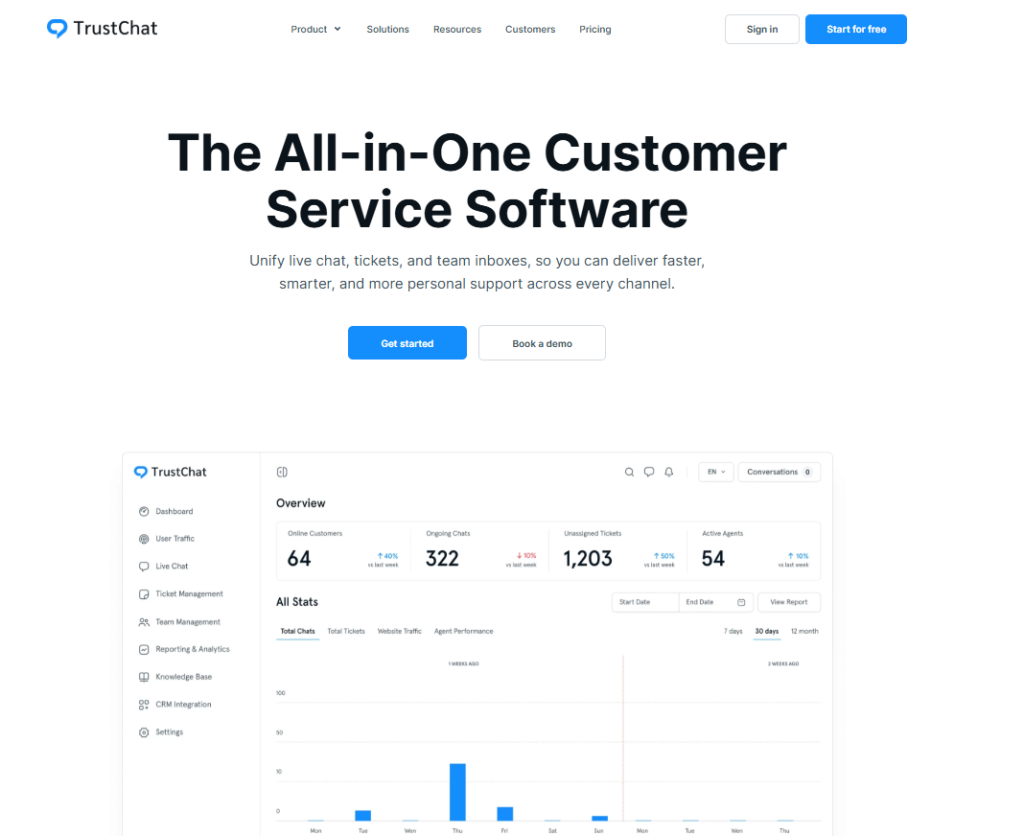
Here’s the thing: training and deploying a custom chatbot based on your business model is very difficult!
Hiring an in-house team of AI engineers and ensuring the chatbot’s accuracy can prove very expensive and hectic, especially for small businesses.
This is why I suggest accessing a reliable and accurate AI chatbot, such as the one offered by TrustChat!
TrustChat is not an ordinary AI chatbot; it is a complete help desk software with features like omni-channel support, knowledge base management, ticket management, etc.
Here’s the best part: you can currently access all the features of TrustChat without spending a dollar; it’s 100% free for new users!
Sign up today and integrate this chatbot with your website…for free!
Final Thoughts
Training and deploying your customer chatbot is not that easy; it’s no secret!
To help you create an accurate and reliable chatbot, I highlighted the key steps involved in the chatbot training process.
If all this sounds complicated to you, you can also sign up for TrustChat and integrate their ready-made AI chatbot for free!
FAQs (Frequently Asked Questions)
1. Is testing necessary before deploying a chatbot?
Yes, this step is definitely recommended by experts. Testing the chatbot responses before deployment lets you identify and fix any issues, and this helps it generate accurate responses.
2. Is it possible to use a chatbot without building one from scratch?
Absolutely, yes! Many platforms, including TrustChat, provide ready-made AI chatbots you can easily integrate with your platform.
3. What kind of data do I need to train my AI chatbot?
Chatbots are trained using training data that includes:
- FAQs
- Recent tickets
- Customer feedback
- Transcripts from customer interactions
You can either create the dataset manually or access open-source training data from online sources.