
Shared email addresses like [email protected] and [email protected] work well at first. Then emails start getting missed, multiple team members reply to the same conversation, and nobody knows who owns what.
Shared inbox software solves that problem. It gives teams a central place to manage shared email addresses, assign conversations, collaborate internally, and track every customer interaction without leaving email behind.
In this guide, you’ll learn how the shared inbox system works, how it compares to Gmail and Outlook shared mailboxes, and when it’s time to move beyond a traditional inbox.
What is Shared Inbox Software
At its core, shared inbox software helps multiple people manage the same email address without stepping on each other’s toes.
Instead of forwarding emails, CC’ing teammates, or wondering who replied last, every conversation lives in a shared workspace. Team members can view emails, assign ownership, leave internal notes, and track progress from a single place.
For example, when a customer emails [email protected], the conversation appears in the shared inbox. A team member can claim it, respond to the customer, collaborate with colleagues if needed, and mark it as resolved once the issue is closed.
The result is a more organized and accountable way to manage shared email addresses, especially as teams and email volume grow.
Shared Inbox vs. Shared Mailbox
Many people use the terms shared inbox and shared mailbox interchangeably, but they’re not the same thing.
A shared mailbox simply gives multiple users access to the same email address. Everyone can read and send emails, but managing conversations often relies on manual coordination.
A shared inbox adds structure on top of that shared access. Conversations can be assigned to specific team members, tracked through different statuses, discussed internally, and monitored to ensure nothing gets missed.
Think of a shared mailbox as a shared room where everyone can see the same messages. A shared inbox turns that room into an organized workspace with ownership, accountability, and workflows built in.
That’s why businesses often start with a shared mailbox in Gmail or Outlook, then move to a shared inbox once email volume and team size begin to grow.
Shared Inbox vs. Email Ticketing System
A shared inbox and an email ticketing system solve many of the same problems, but they approach them differently.
A shared inbox focuses on collaboration around email conversations. Team members can share access, assign ownership, leave internal notes, and reply from a common email address. An email ticketing system goes a step further by converting incoming emails into tickets. Each conversation receives its own status, owner, history, and workflow, making it easier to track requests from start to finish.
The line between the two categories has become increasingly blurred. Many modern shared inbox platforms automatically convert emails into tickets behind the scenes, giving teams the familiarity of email with the structure of a help desk.
For most businesses, the goal isn’t to replace email. It’s to add accountability and visibility without changing how customers communicate.
Shared Inbox vs. Omnichannel Help Desk
A shared inbox manages email conversations. An omnichannel help desk brings every customer conversation into the same workspace.
Instead of switching between email, website forms, live chat, WhatsApp, Facebook Messenger, and other platforms, teams can manage everything from a single dashboard.
The biggest advantage isn’t convenience. It’s context.
When all channels feed into one system, agents can see the full conversation history regardless of where the customer reached out. That reduces duplicate work, speeds up responses, and creates a more consistent support experience.
Many businesses start with a shared inbox to organize email. As support operations grow, they often expand into an omnichannel help desk to centralize customer communication across every channel.
How Shared Inbox Software Works
Shared inbox sits between your email provider and your support team. Customers continue sending emails as they always have, while the software adds structure, collaboration, and accountability behind the scenes.
Connect One or Multiple Shared Email Addresses
The first step is connecting your shared email addresses, such as [email protected], [email protected], or [email protected].
Instead of logging into separate inboxes throughout the day, your team manages every shared address from a single workspace. This gives agents one place to monitor, respond to, and organize incoming conversations.
Turn Incoming Emails Into Trackable Conversations
When a customer sends an email, the system captures it automatically and creates a trackable conversation.
Rather than disappearing into a crowded inbox, each request becomes a piece of work that the team can monitor, prioritize, and resolve. This creates visibility from the moment an email arrives until the issue is closed.
Assign Ownership and Statuses
One of the biggest challenges with shared mailboxes is accountability.
Shared inbox software solves this by allowing teams to assign conversations to specific team members. Everyone knows who owns the conversation, what stage it’s in, and whether action is still required.
This reduces confusion and prevents important emails from falling through the cracks.
Collaborate Without Forwarding Emails
Support often requires input from multiple people.
Instead of forwarding emails back and forth or creating long internal email chains, team members can leave private notes, tag colleagues, and discuss customer issues directly within the conversation.
Customers only see the final response. The internal discussion stays private.
Reply From the Correct Department Address
Customers expect replies from the same email address they originally contacted.
Shared inbox software allows agents to respond using the appropriate department address while keeping the entire conversation history visible to the team.
The customer sees a seamless conversation. The team gets full visibility and collaboration behind the scenes.
Track Performance and Workload
As email volume grows, managers need more than just access to conversations.
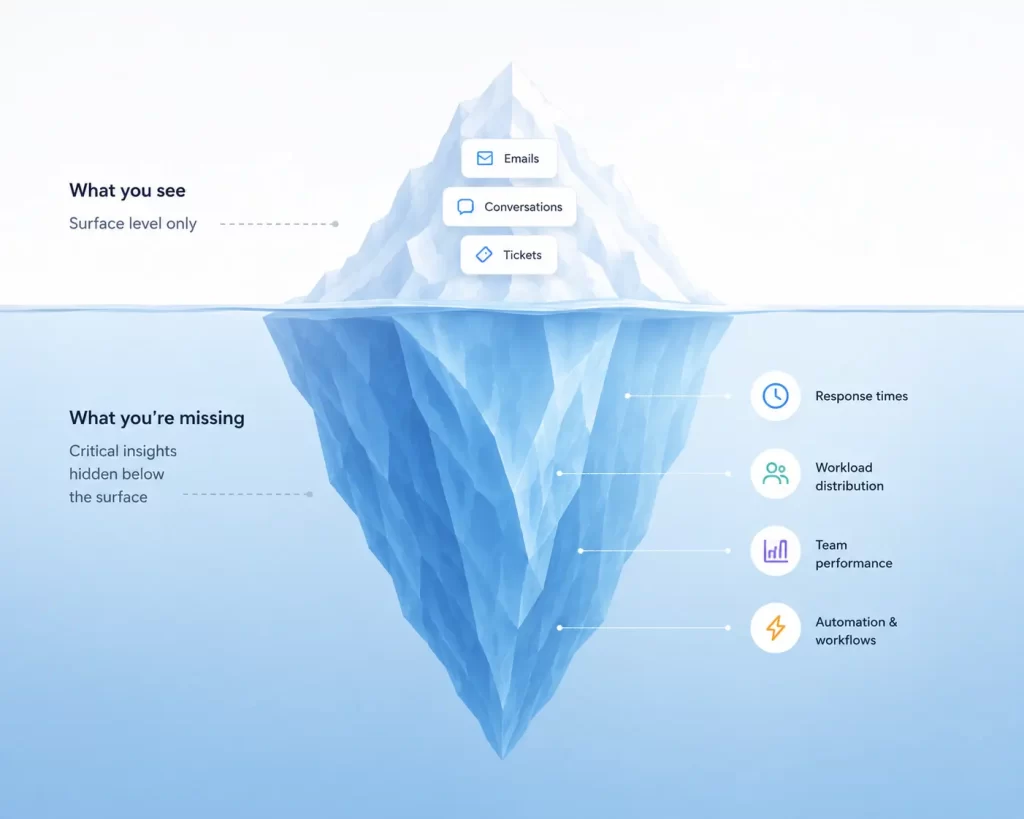
Most shared inbox platforms provide reporting on response times, workload distribution, resolution rates, and team performance. This helps businesses identify bottlenecks, improve service levels, and scale support operations more effectively.
Why Teams Outgrow Gmail and Outlook Shared Mailboxes
Gmail and Outlook can handle a shared mailbox. The challenge isn’t access. It’s coordination. When a few people occasionally monitor a shared inbox, native email tools work well enough. As email volume grows, teams need ownership, visibility, and workflows that traditional mailboxes weren’t designed to provide.
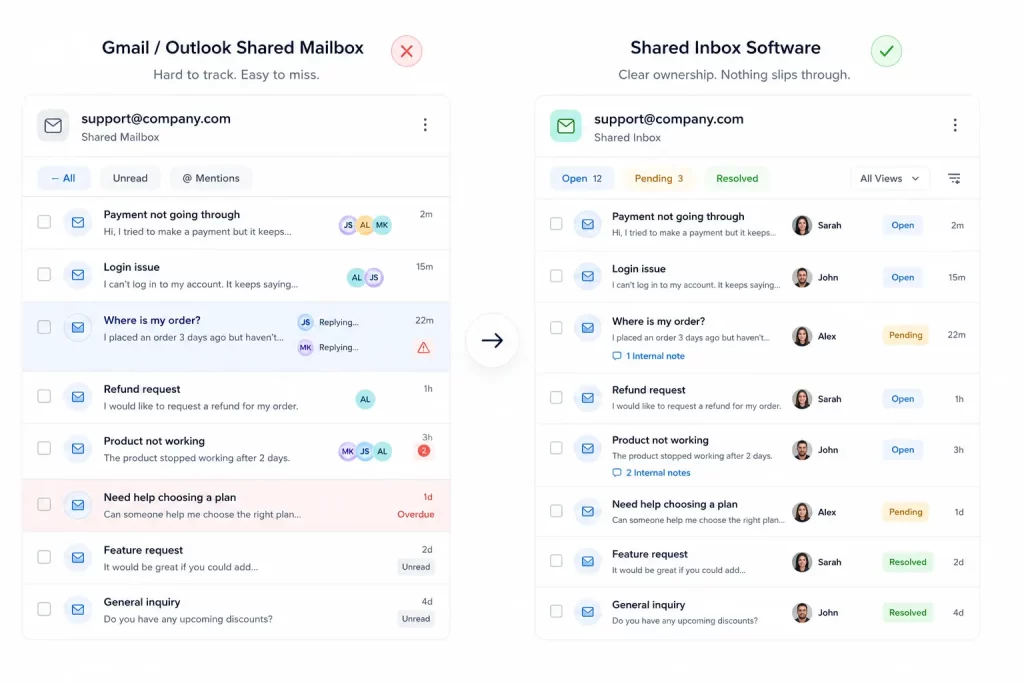
Shared Access Doesn’t Create Accountability
A shared mailbox lets everyone see the same emails, but it doesn’t tell you who’s responsible for replying. Without clear ownership, people make assumptions. One team member thinks someone else has handled the conversation, while the customer waits for a reply that never comes.
Shared inbox software solves this by assigning ownership and making responsibility visible across the team.
Duplicate Replies Become More Common
Multiple people can open and reply to the same email at the same time. One agent starts writing a response, another does the same, and the customer receives two different replies to the same question.
Shared inbox prevents this with collision detection and real-time visibility into who’s actively working on a conversation.
Important Emails Get Buried
Traditional inboxes organize messages. They don’t manage work.
A high-priority customer issue sits beside routine questions and sales inquiries. Without statuses, assignments, or prioritization, important conversations can easily get overlooked.
A shared inbox adds structure by tracking conversations from arrival to resolution.
Internal Collaboration Is Clunky
Support often requires input from multiple teams. In Gmail and Outlook, that usually means forwarding emails, creating separate email chains, or jumping between communication tools. As conversations spread across different platforms, context gets lost and collaboration slows down.
Shared inbox software keeps internal discussions attached to the conversation itself. Team members can leave notes, tag colleagues, and collaborate without exposing those discussions to customers.
Managing Multiple Inboxes Creates Complexity
Most businesses manage more than one shared inbox. Support, sales, billing, partnerships, careers, and operations often live in separate mailboxes. Each inbox creates another place to monitor, organize, and manage conversations. Shared inbox software centralizes those inboxes in a single workspace while keeping teams, workflows, and responsibilities organized.
Reporting and Automation Are Limited
As support volume grows, managers need more than access to emails. They need visibility into response times, open conversations, workload distribution, and team performance.
Traditional shared mailboxes provide little insight into those metrics. Shared inbox software adds reporting, automation, and workflow controls that help teams scale without losing accountability.
Key Features to Look for in Shared Inbox Software
Not all shared inbox platforms are built the same. Some simply add shared access to email, while others provide the workflows, visibility, and automation needed to manage customer conversations at scale.
Here are the features that matter most.
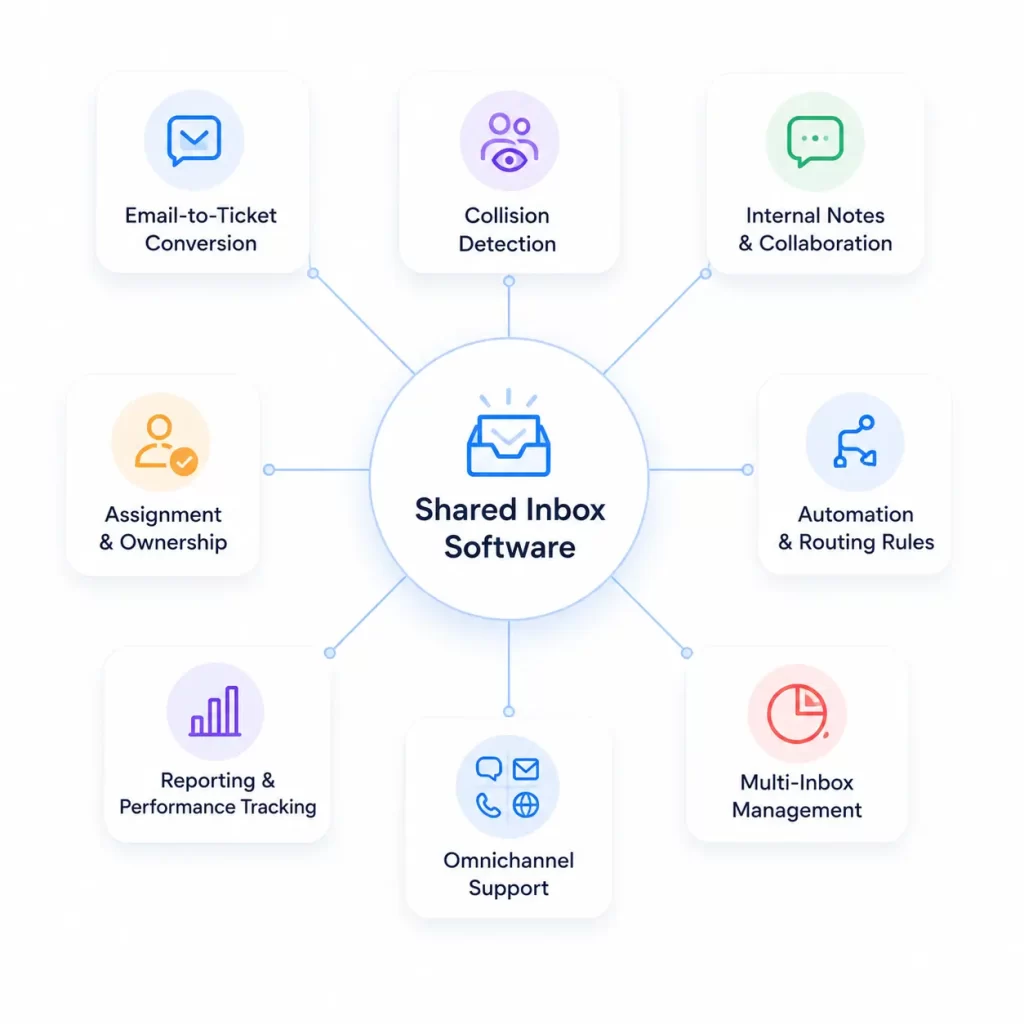
Automatic Email-to-Ticket Conversion
As email volume grows, teams need more than a list of messages. They need a way to track work.
Automatic email-to-ticket conversion turns every incoming email into a trackable conversation with an owner, status, history, and resolution path. This creates accountability from the moment a request arrives.
Collision Detection
Nothing damages the customer experience faster than duplicate replies. Collision detection shows when another team member is viewing, typing, or actively handling a conversation. This prevents duplicate work and ensures customers receive consistent responses.
Internal Notes and Team Collaboration
Many customer conversations require input from multiple people before a response can be sent.
Internal notes allow teams to discuss issues, ask questions, and collaborate directly within the conversation. The customer only sees the final response, while the team keeps all context in one place.
Assignment and Ownership
Assignment tools allow managers to distribute work across the team and ensure each request has someone responsible for moving it forward. This reduces confusion and eliminates the “I thought someone else was handling it” problem.
Automation and Routing Rules
Automation rules can assign conversations, route requests to the correct department, apply tags, update statuses, and trigger workflows based on predefined conditions. This reduces repetitive work and helps teams respond faster.
Reporting and Performance Tracking
You can’t improve what you can’t measure. Reporting tools provide visibility into response times, resolution rates, open conversations, workload distribution, and team performance. These insights help managers identify bottlenecks and make better operational decisions.
Multi-Inbox Management
A strong shared inbox platform allows teams to manage support, sales, billing, partnerships, and other departments’ inboxes from a single workspace while keeping workflows organized and separated when needed.
Omnichannel Support
Many shared inbox platforms now support website forms, live chat, social media messages, and messaging apps alongside email. This gives teams a unified view of customer communication across every channel.
Who Uses Shared Inbox Software?
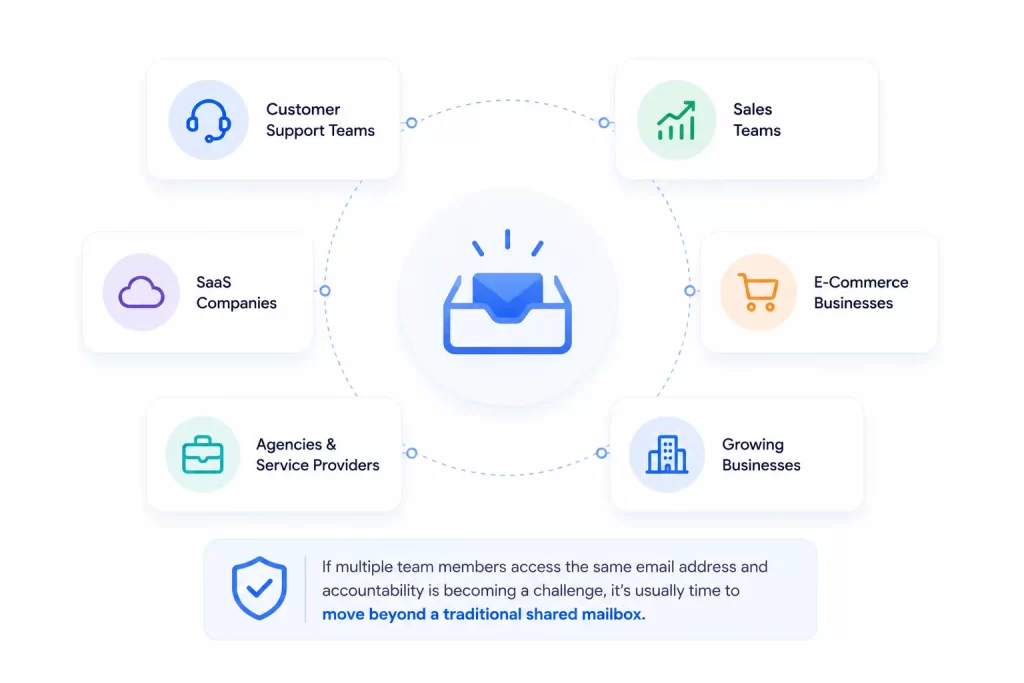
Any business where multiple people manage customer conversations can benefit from a shared inbox.
Common use cases include:
- Customer Support Teams managing support requests and technical issues.
- Sales Teams handling inbound leads and inquiries.
- SaaS Companies managing support, billing, and product-related conversations.
- E-Commerce Businesses handling orders, refunds, and delivery questions.
- Agencies and Service Providers coordinating communication across clients and departments.
- Growing Businesses managing shared inboxes across support, sales, billing, partnerships, and operations.
If multiple team members access the same email address and accountability is becoming a challenge, it’s usually time to move beyond a traditional shared mailbox.
Questions to Ask Before You Buy
Not every shared inbox platform is built for the same use case. Before choosing one, it’s worth understanding what your team actually needs today and what you may need six months from now.
How Many Shared Addresses Do You Need?
Some businesses only manage a single support inbox. Others operate separate inboxes for sales, billing, partnerships, careers, and customer support.
Make a list of every shared email address your team currently uses. Then consider whether you’ll be adding more as the business grows. The right platform should support your current workflow without forcing you to switch tools later.
Do You Need Tickets, or Just Collaboration?
If your primary challenge is multiple people managing the same inbox, a collaborative shared inbox may be enough.
If you need ownership, statuses, reporting, SLAs, and workflow automation, look for a platform that automatically converts conversations into tickets. This provides greater accountability and makes it easier to scale support operations.
Do You Need Omnichannel Now, or Later?
Many businesses start with email and add other channels over time.
If you expect to support live chat, website forms, WhatsApp, Facebook Messenger, Instagram, or other communication channels in the future, it’s worth considering a platform that can grow with those requirements.
Migrating customer conversations between systems later can be more difficult than choosing a scalable solution from the start.
What Reporting and Routing Do You Need?
Basic shared inboxes focus on collaboration. More advanced platforms provide reporting, automation, and routing capabilities.
Think about the metrics you want to track and the workflows you want to automate. If response times, workload balancing, conversation routing, and performance reporting matter to your business, make sure those capabilities are available before making a decision.
Frequently Asked Questions (FAQs)
A shared mailbox allows multiple users to access the same email address. A shared inbox adds collaboration tools, ownership, assignments, internal notes, automation, and reporting on top of that shared access.
No. Customers continue using email as normal. A shared inbox simply adds structure, visibility, and collaboration behind the scenes.
Many modern shared inbox platforms automatically convert incoming emails into tickets, making it easier to assign, track, and resolve customer requests.
For small teams with low email volume, Gmail and Outlook shared mailboxes may be sufficient. As teams grow, businesses often need ownership, reporting, automation, and collaboration features that traditional mailboxes don’t provide.
Yes. Most platforms allow businesses to manage multiple shared addresses, such as support, sales, billing, and partnerships, from a single workspace.
Omnichannel support combines conversations from multiple channels, such as email, live chat, website forms, and social media, into a single inbox.
Any team that manages customer conversations across shared email addresses can benefit from a shared inbox, particularly customer support, sales, e-commerce, SaaS, and service-based businesses.